Case Study
AverraSchool Administrator Workspace
Turning school data into clearer operational decisions for administrators.
The challenge
School administrators need answers, not more disconnected data.
The opportunity was to create a school administration workspace that brings the most important operational signals into one connected experience.
— Give administrators a clear picture of what is happening across the school.
— Surface issues that need attention instead of making users hunt for them.
— Move naturally from school-wide signals into classes, students and records.
— Respect differences in how schools structure classes and operations.
The product model
Context → Status → Signal → Detail → Action
The workspace follows the administrator's path from understanding the school at a glance to acting on a specific issue.
Context
Start with the school's overall operational picture.
Status
Understand attendance, finance, academics and safety.
Signal
Surface exceptions and areas that need attention.
Detail
Move from the school view into classes, students and records.
Action
Give administrators enough context to decide what to do next.
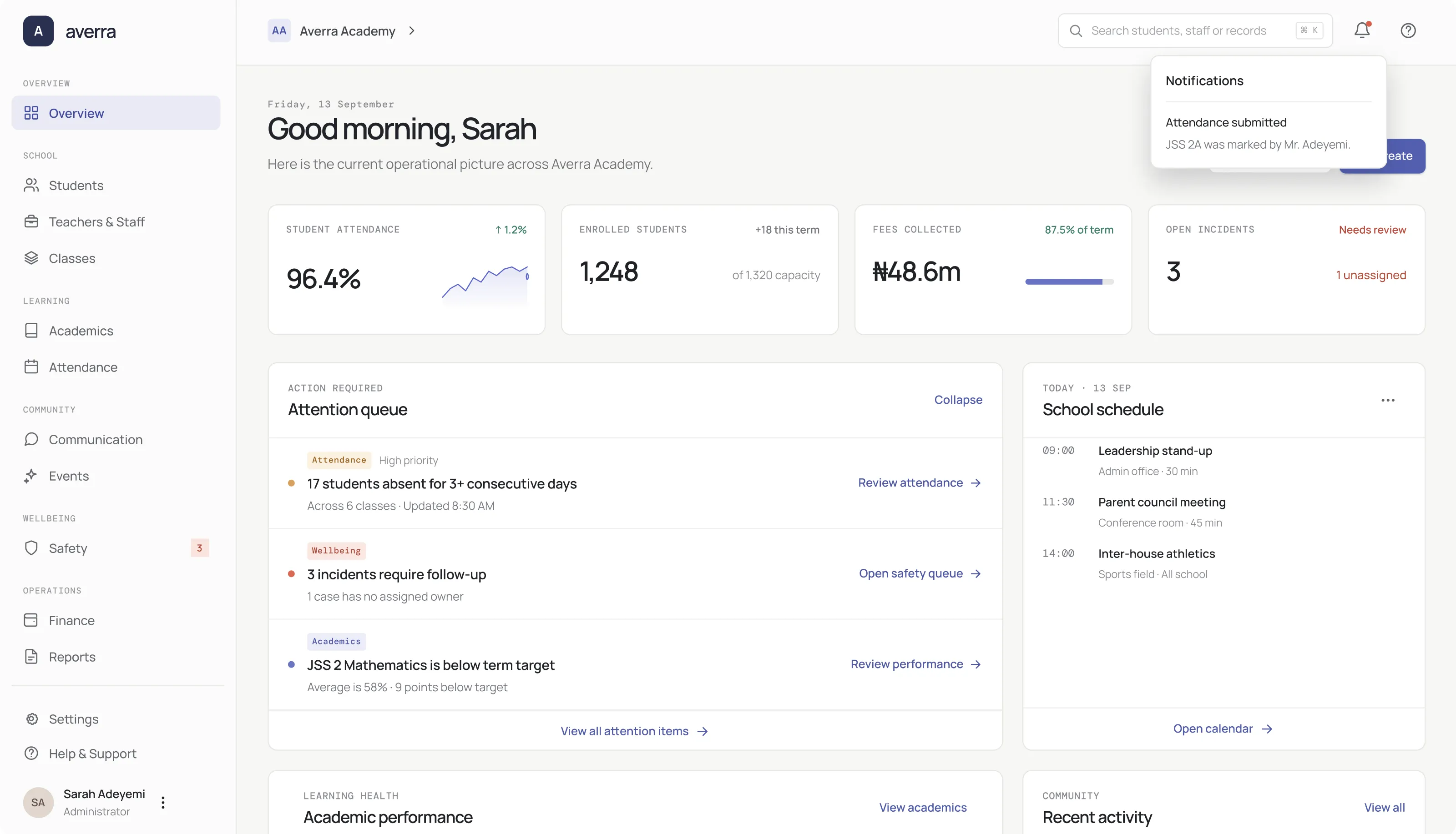
01 — Overview
A school-wide view designed around what needs attention.
— Attendance, students, finance, safety and academics sit within the same working view.
— Issues that may require intervention are given more weight than secondary metrics.
— High-level metrics establish context before supporting sections provide deeper detail.
— The dashboard is a starting point for deeper administrative work rather than a reporting dead end.
— A restrained visual system keeps a data-heavy workspace readable.
— The experience is organized around one question: what needs attention now?
02 — Students
From a school-wide view to the students inside it.
The student directory turns the broad school population into a manageable administrative workspace without losing useful context.
— The main screen makes the student population easy to scan and navigate.
— Student identity, class and status remain visible throughout the directory.
— The interface supports operational work without becoming visually crowded.
— Multi-selection makes the shift from browsing to acting explicit.
03 — Student Profile
A student record with the context needed to understand the signal.
— Name, class and core student information establish context immediately.
— The overview provides enough information before moving into detailed records.
— Attendance, academics and history remain connected to the same student.
— Attendance and performance summaries help explain why a student matters within the wider workflow.
— The same student record can be reached from directory, attendance and class views.
04 — Attendance
Turn attendance data into something an administrator can act on.
Attendance is treated as an operational workflow rather than simply another report. The goal is to help administrators identify patterns and move toward the individual records behind them.
— Consecutive absence is treated as a meaningful signal instead of another isolated number.
— The attendance workspace connects directly to individual student records.
— Administrators can move from a school-wide attendance concern into the students behind it.
— The page is designed to help administrators understand and respond, not only record attendance.
05 — Classes
Give administrators class context without sending them away from the list.
— Class information can be inspected without turning every interaction into another page.
— The drawer keeps the administrator anchored to the class list while revealing more detail.
— Classes bring together teachers, students, subjects and performance context.
— Individual students can still be reached from the class context when deeper investigation is needed.
— Class detail is revealed while the parent list remains visible.
06 — Academics
Make academic performance readable at the level decisions are made.
— Results are presented alongside classes, subjects and school structure.
— Performance signals help identify where attention may be needed.
— The workspace is designed around school-level oversight rather than an individual learner's dashboard.
— Academic information fits into the wider school reporting model.
07 — Class structure
School structure should be configurable, not hardcoded.
Schools do not all organize classes in the same way. Averra treats class naming as structured configuration so the rest of the workspace can follow the school's own model.
— A school can use conventional class arms such as A, B and C, or named groups such as Phoenix and Shimar.
— The interface shows the resulting class names as the configuration changes.
— Administrators configure the convention once instead of manually creating inconsistent class names throughout the product.
— The same structure can inform Students, Classes, Attendance, Academics, Reports and related administrator records.
— The product adapts to different school structures without changing the underlying workspace model.
Design decisions
The interface is built around the administrator's next decision.
Prioritize
Surface what may require attention before secondary detail.
Connect
Keep school, class and student records part of one working model.
Reveal
Use progressive detail instead of filling every screen with everything.
Adapt
Allow school-specific structures where a rigid global pattern would break.
Reflection
A school management workspace should help administrators decide what matters next.
Averra brings school-wide context, operational signals and individual records into one connected experience. The strongest decisions came from resisting the temptation to show everything at once and instead making each layer useful for the next.